Seven platforms. One paste.
Ssokkit is the all-in-one downloader for Windows. Save videos from the sites you actually use, pull the audio out as MP3, and capture and mark up your screen — all from one app in your tray.
Purchases open soon. You can start with the free trial in the meantime.

Downloads from
- Douyin
- TikTok
- YouTube
- X
- Threads
Copy the link. Ssokkit handles the rest.
Ssokkit notices links on your clipboard, so saving a video takes one paste. Pick the quality — best, 1080p, 720p or 540p — and the file lands in your folder, sorted by platform or by creator if you like.
- Douyin videos in the original, without the watermark — photo sets too
- YouTube videos and Shorts, Instagram Reels and posts, Threads videos and photos, TikTok, X and Reddit
- Press Ctrl+Alt+D anywhere to download the link on your clipboard
Download only what you own or have permission to save.
Downloads\SsokkitDouyin@creator_aphoto set · 9 imagesYouTube@channel_b1080p · mp4Instagram@studio_cjust savedWhen you only need the sound.
Extract the audio from a YouTube link or another supported site, or drag video files from your PC straight in. Ssokkit reads mp4, mov, mkv, webm, avi, m4a, wav and more, and writes a clean MP3.
- Choose 320, 256, 192 or 128 kbps
- Works with links and with files already on your PC
interview.movinterview.mp3live-set.mkvlive-set.mp3voice-memo.m4avoice-memo.mp3
Capture it, mark it up, send it.
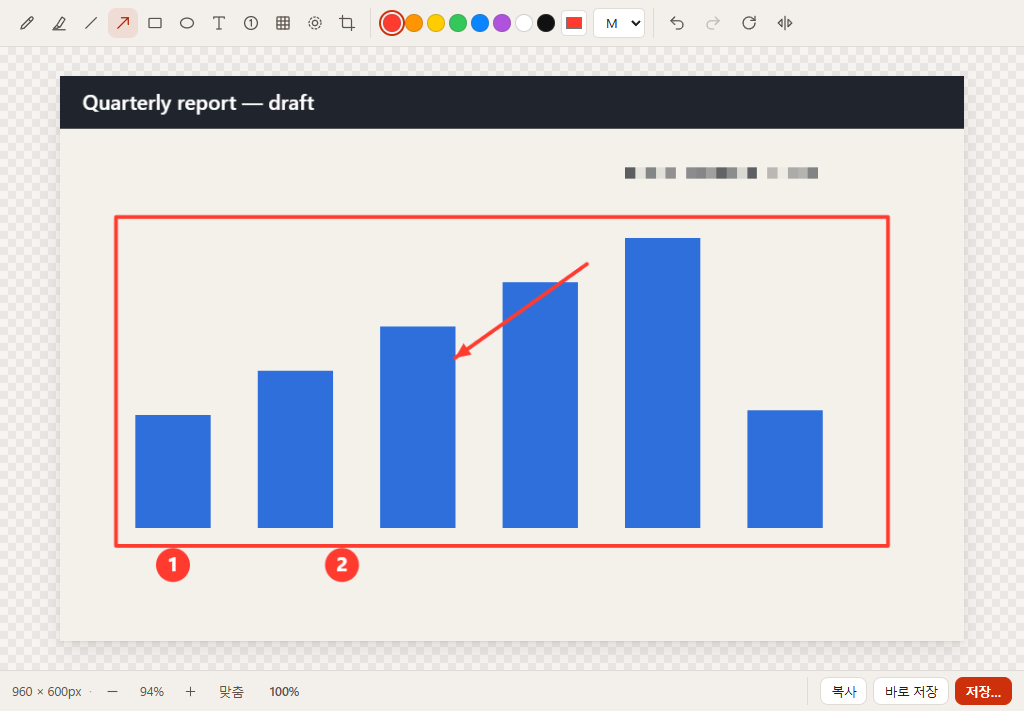
Grab a region, the full screen or a single window, with a delay timer when you need a menu open. The editor opens straight away, with everything you need to explain something on a screenshot.
- Pen, highlighter, line, arrow, rectangle, ellipse, text and number stamps
- Mosaic and blur for anything private; crop, rotate and flip
- Undo and redo, copy to the clipboard or auto-save, export PNG or JPG

The small tools you keep reaching for.
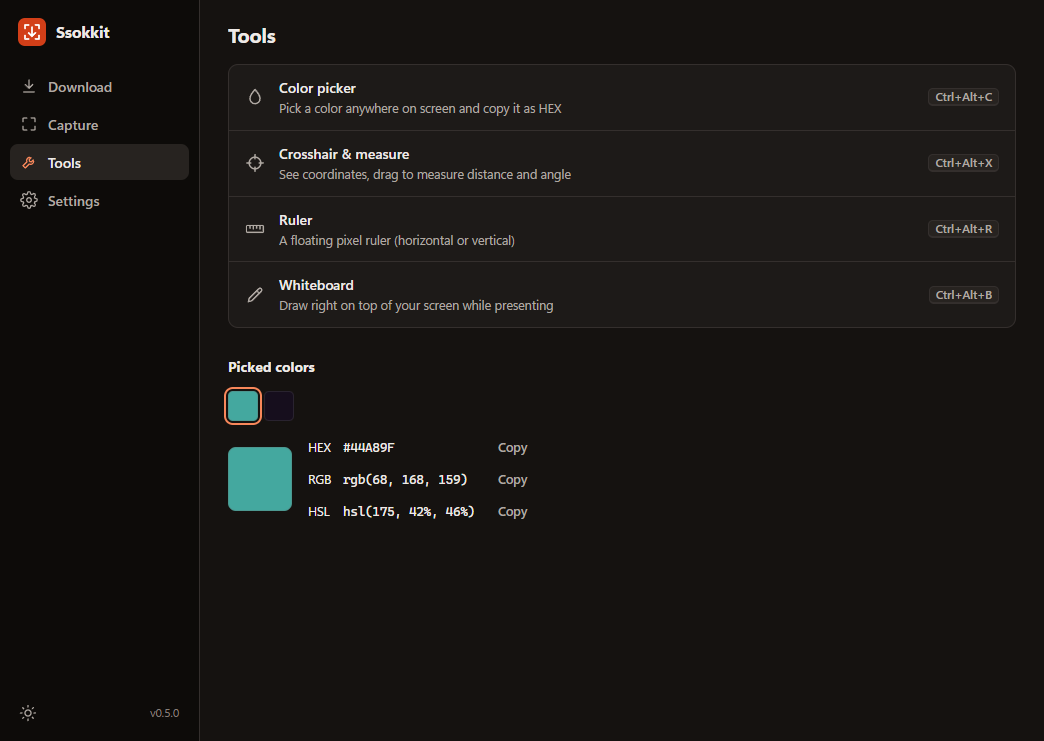
Each one sits behind a hotkey, ready when you need it.
Color picker
Pick any pixel on screen and copy it as HEX, RGB or HSL. Recent colors stay in your history.
Crosshair & measure
Read exact coordinates, then drag to measure distance and angle.
Pixel ruler
A floating ruler you can lay over anything, horizontally or vertically.
Whiteboard
Draw right on top of your screen while you present or walk someone through a screen share.
Lives in your tray, speaks your language.
Ssokkit keeps running in the system tray, so every feature is one hotkey away — and you can set the hotkeys yourself. Light or dark theme, and an interface in English, 한국어, 日本語, 中文, Español, Deutsch and Bahasa Indonesia.
Three steps, no detours.
Copy the link
Use Share → Copy link in the app or your browser, like you always do.
Paste into Ssokkit
Ssokkit spots it on your clipboard. Or press Ctrl+Alt+D from anywhere.
Done
The file is saved in your Ssokkit folder, ready to watch, share or edit.
Pay once. Keep it.
One lifetime license for $29.99, on up to 3 PCs. No subscription, nothing to renew.
Not sure yet? The free trial gives you 3 downloads a day at up to 720p, and full use of capture and the screen tools.
$29.99one-time payment
Purchases open soon. You can start with the free trial in the meantime.
Compare free and lifetimePayments are securely processed by Paddle.
Questions, answered
What can I do with the free trial?
Download is free with limits: 3 downloads a day, at up to 720p. Screen capture, the image editor and all the screen tools work fully in the trial. A lifetime license removes the download limits.
Can I use one license on more than one PC?
Yes. One license activates Ssokkit on up to 3 PCs at the same time.
I got a new PC. How do I move my license?
Open My license, enter your key and purchase email, and release the PC you no longer use. Then activate Ssokkit on the new PC with the same key.
What if Ssokkit isn't right for me?
You're covered by a 14-day money-back guarantee. Email support@ssokkit.com within 14 days of purchase with your order ID and we'll refund you. Details are in our refund policy.
How is payment handled?
Payments are securely processed by Paddle, our reseller and merchant of record. Paddle sends your receipt, handles any sales tax, and appears on your statement. We never see your card details.
What do I need to run Ssokkit?
A PC with Windows 10 or Windows 11, 64-bit, and an internet connection for downloading. Ssokkit doesn't run on macOS or phones.
Can I download any video?
Only content you own or have permission to download. Respect copyright and each platform's terms of service — you are responsible for how you use what you save.
Your next link is already on the clipboard.
Download the free trial and try it with the video you were about to save.
Purchases open soon. You can start with the free trial in the meantime.